The Web App: Overview and Navigation
This page is your map of the Alpheous web app: what it is for, how it differs from Slack, and how to find your way around it. Once you recognize the shared layout, every other app page reads faster.
Slack is where you talk to the agents and approve their work in the flow of your day. The web app is where that work lands as finished, organized screens: your day, your meetings, the people and firms you cover, the queue of drafts waiting on you, and the signals the agents are watching. Think of Slack as the conversation and the app as the workspace it produces.
:::tip Why This Page Matters The web app is one of three places you meet Alpheous (alongside Slack and the operator console), and it is where your prepared work collects. Learning its navigation once means you can open any area and know where to look. :::
The App Shell: Sidebar and Top Bar
The shell is the frame that stays put while the content changes. The sidebar on the left and the bar across the top look the same on every page, so wherever a workflow takes you, the way back is always in the same spot.
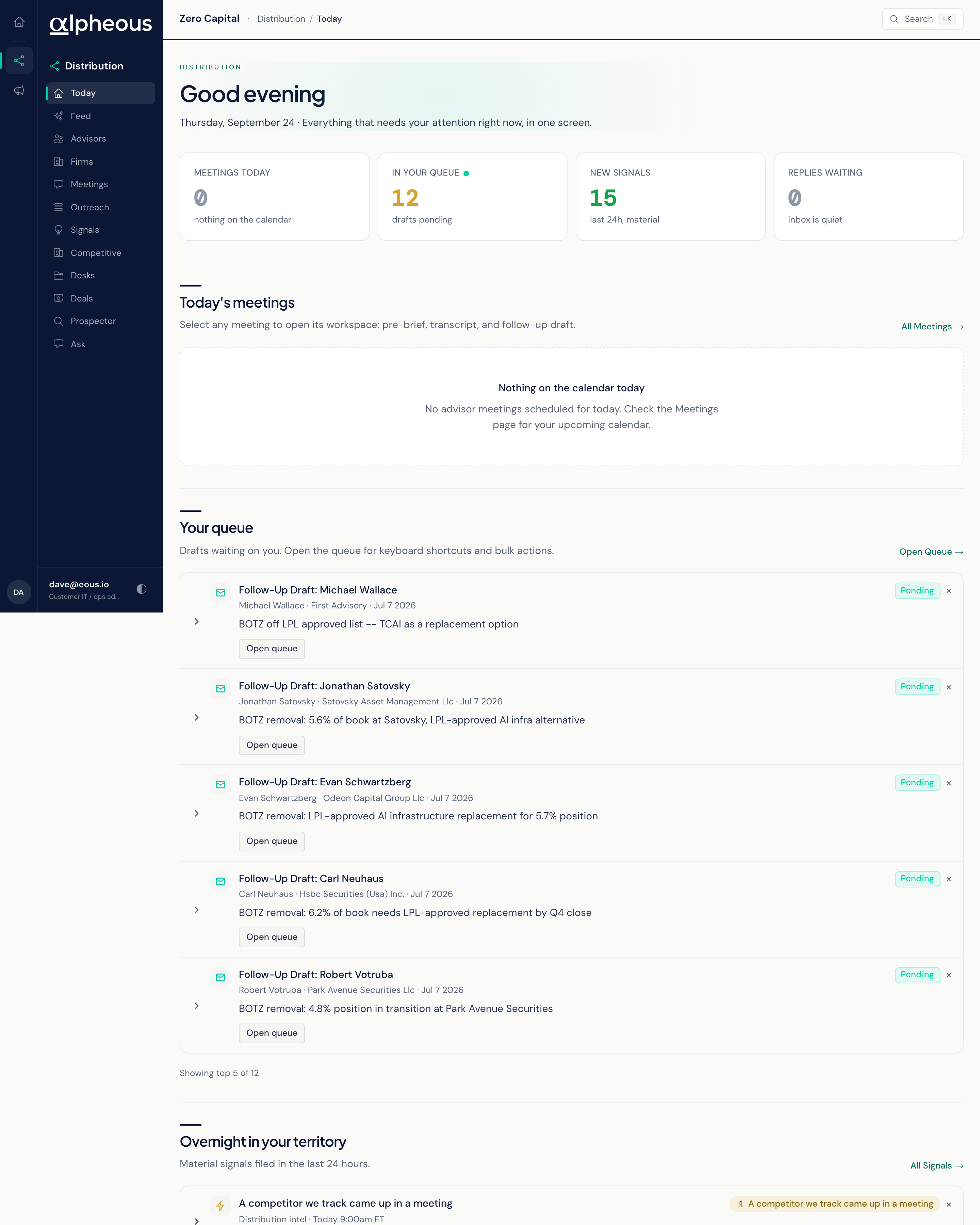
- Sidebar Your whole workspace lives in this one rail, with every area of the app one click away.
- App Context You are in the customer app, the surface built for daily distribution work, separate from the operator and admin views your firm's administrators use.
- Location Indicator The top bar always shows where you are, so even the deepest workspace never leaves you guessing how you got there.
- Theme Toggle Switch between light and dark to match your room and the time of day.
Finding Your Way Around
The sidebar carries every area of the app. Today is your daily starting point: a prioritized read of your meetings, your queue, and what changed overnight. Meetings holds your upcoming and past calls and the workspace behind each one. Advisors and Firms are where your coverage lives: the advisors you track and the wider universe you can browse, and the scored universe of firms behind them. Feed and Signals surface the daily action cards and the territory-wide signal feed. Outreach is where drafted work waits on you, where you compose a new message, and where autonomous calls are queued. Competitive, Desks, and Deals give you a read on how your funds are doing against the market, which firms are hot right now, and the state of your open pipeline. Prospector is where you hand off a list of firm domains for research. Ask is where you put a question to Alpheous and get a grounded answer.
To move between areas, click an item in the sidebar. Wherever you land, the top bar names your current location.
The Recurring Page Layout
Most screens in the app follow the same pattern: a header that names the area, a band of key numbers, then one or more sections holding lists you can act on. Once that rhythm is familiar, a page you have never opened still feels readable. Look at the header to confirm where you are, read the numbers for the shape of the work, then go down the lists.
The Global Ask Shortcut
Anywhere in the app, you can open Ask without leaving the screen you are on and put a question to Alpheous in plain English. Use it to pull a quick brief on an advisor, check a recent filing, or ask something about a fund you cover.
Related
- Today: the daily starting point this page points you toward.
- Ask: the question-and-answer surface reachable from anywhere.
- Getting Started: sign in and send your first request.