Outreach
Outreach is one screen with two tabs, Hot-Firm and Voice, covering the two automatic outreach paths in Alpheous: drafting an email the moment a firm turns hot, and the rules your voice agent follows when it places a call. By default, both paths hold for your approval before anything reaches an advisor or a firm.
:::tip Why This Page Matters These are the settings that decide whether outreach happens automatically at all, and under what limits. A Gmail draft always waits for a person to send it. A call is held for your release by default, and on every call a compliance check and a fail-closed dial guard apply regardless. :::
Hot-Firm: Auto-Drafting When A Firm Turns Hot
This tab controls whether a firm crossing your hot threshold on the signal feed automatically creates a real Gmail draft addressed to that firm's driving contact, queued for the firm's owner to approve. Nothing is sent without a person approving it.
A glance band shows whether Auto-Drafting is On or Off, your Dedup Window in days, and who last set these values: this install, the platform default, or the built-in default. A save here only ever writes your own install's setting; it never touches the shared default.
Two settings:
- Create Gmail Drafts For Hot Firms The toggle that turns auto-drafting on or off. Turning it on asks you to confirm first, since every hot-firm crossing from that point on creates a real Gmail draft in the firm owner's mailbox.
- Dedup Window How many days, from 0 to 365, to skip re-drafting a contact who already received a hot-firm draft. A window of 0 means every crossing drafts again, even for a contact who was just drafted.
The setting takes effect within about a minute of saving, with nothing else for you to do. Every draft this produces still goes through your compliance rules and waits for a person to send it.
Voice: Calls, Templates, And Compliance
This tab configures your voice agent: what it calls about, how it behaves on a call, when it is allowed to dial, and which optional call types are switched on.
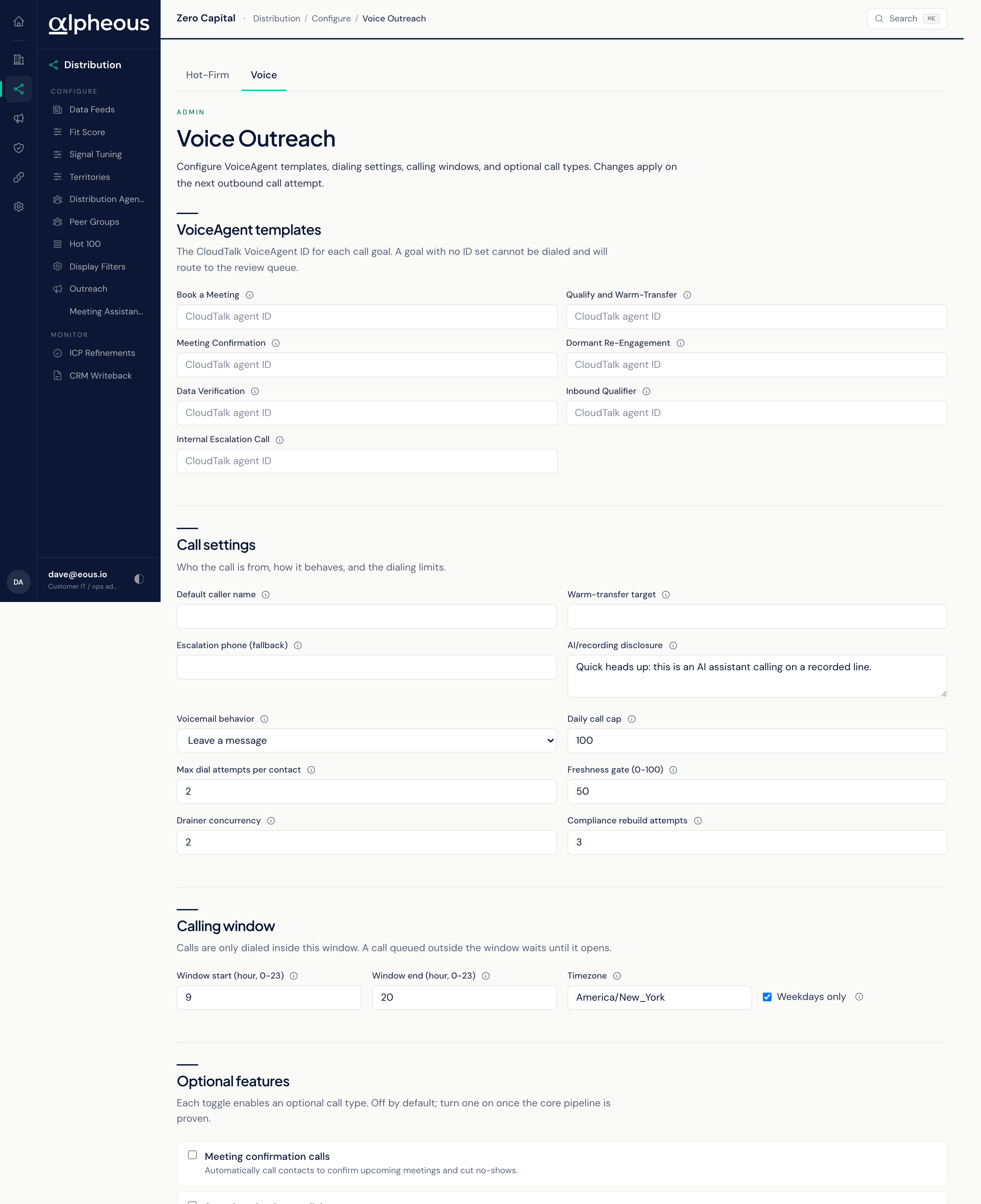
- Call Templates A template per call goal. A goal with no template configured cannot be dialed; it routes to your review queue instead.
- Call Settings The Default Caller Name the agent represents, a Warm-Transfer Target to hand a live call to, an Escalation Phone as the fallback for a severity-one escalation call when no staff member is flagged, the AI and recording disclosure spoken at the start of every call, Voicemail Behavior (leave a message or hang up), a Daily Call Cap, a Max Dial Attempts limit per contact, a Freshness Gate from 0 to 100 that skips extra enrichment on a contact whose data is already fresh enough, a concurrency limit on how many calls are prepared at once, and how many times a call brief that fails compliance is rewritten before it routes to your review queue instead.
- Calling Window A Window Start and End hour, both 0 to 23, a Timezone, and a Weekdays Only toggle that blocks calls on Saturday and Sunday.
- Optional Call Types Six toggles, all off by default: Meeting Confirmation Calls, Speed-To-Lead Auto-Dial, Dormant Re-Engagement, Data Verification Calls, Inbound Call Handling, and Internal Escalation Calls, which phones your on-call person for a severity-one event and never reaches an advisor or a firm.
Related
- Voice Outreach: what the agent does with these settings on an actual call.
- Signal Outreach: the agent whose drafts the Hot-Firm setting turns into automatic Gmail drafts.
- Signal Tuning: where you set the thresholds that decide when a firm counts as hot.