System Status
System Status is your single view of the whole agent team: which agents are active, how much they've done, and what it has cost, over a window you choose. This page covers both views that make it up: Agents, the roster, and Activity, the detailed stream behind it.
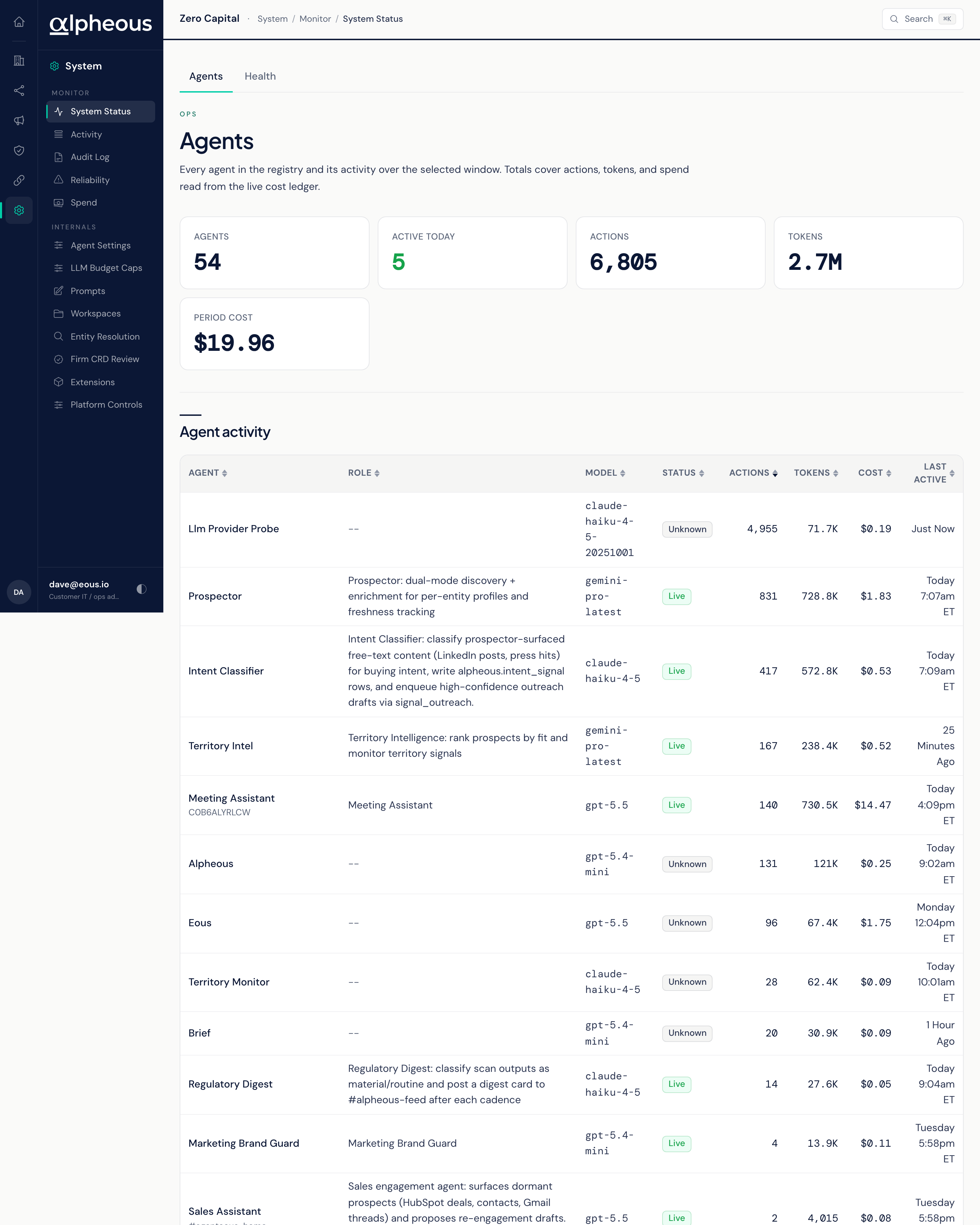
Agents
The default window is 14 days. A glance band totals your active agents, how many took action today, the actions they took, and what it cost, for the selected window. The table below lists every agent in your roster with its role, the model it runs on, its current status, how many actions it has taken, what it has cost, and when it was last active.
Start here when you want a quick read on whether everything is running: scan the table for an agent that's gone quiet when it shouldn't have, or one whose cost looks out of line.
Activity
Activity is the detailed record behind those totals: every individual action the agents took, filterable by day and by agent. Each row shows which agent acted, what it cost, and the context it ran in. A glance band above the table totals your actions and cost for the window, plus your average cost per action, and a daily chart shows the pattern day over day.
Use Agents for the fleet-level read, and Activity when you need to follow one agent's recent work in detail.
Related
- Reliability: errors and incidents, for when something needs your attention.
- Spend: what running the system costs, and what it saves you.
- Platform Event Log: the wider event stream this activity feeds into.